
Free MB to KB Image Compressor to Resize Images Online
Drop images here or click to upload
Support: PNG, JPEG, WebP
The image size is too large, so it won’t upload properly, and your website becomes slow. If your image size is more than 100 KB and you’re facing the same issue, then the MB to KB Image Compressor tool is the perfect solution for you. With this tool, you can reduce your image size as much as you want and customize it easily. It’s a completely free online image resizer that also takes care of your privacy.
Resize, Compress and Optimize Images
Welcome to mbtokb, a free online image compressor that helps you reduce the size of multiple images at once without affecting quality.
Our MB to KB Image Compressor makes image optimization fast, simple, and secure. You can compress multiple images at once, reduce image size in kilobytes, control quality, and download optimized files instantly. It supports JPG, PNG, and WEBP formats, works on all devices, and protects your privacy by not storing images after processing. Best of all, it’s completely free and beginner-friendly.

How to Change Your Images Sizes ?
Step 1: Upload Your Images
Drag and drop your images into the upload area or click Choose Images to upload files from your device. You can upload single or multiple images at once in JPG, PNG, or WEBP format.

Step 2: Set Your Target Size
After uploading your images, enter your required size in the Target Size box.
Then select KB or MB from the dropdown menu to choose your preferred unit.
This step allows you to control the final size of your compressed image.

Step 3: Compress Images
Click the green Compress Images button to start the process.
The tool will automatically compress your images and display:
- Original file size
- Compressed file size
- Percentage of space saved
If you want to upload new images, use the Clear All button to reset the tool.
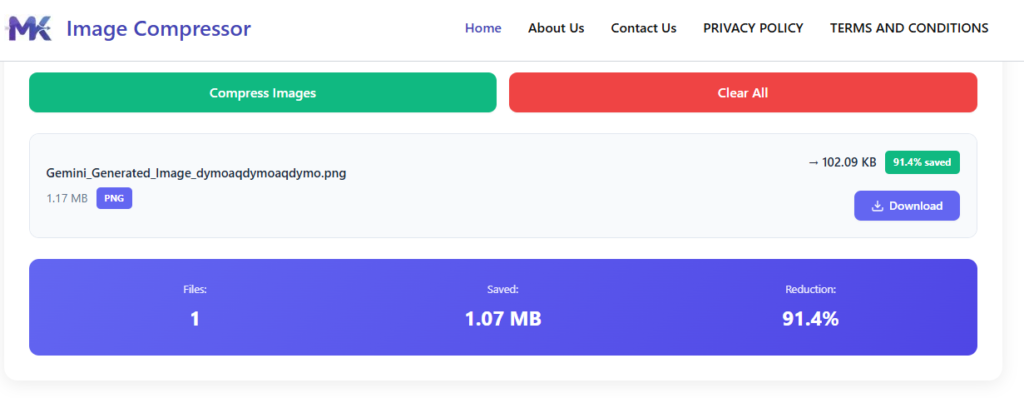
Step 4: Download Your Image
Once the compression is complete, a Download button will appear next to each image.
Click this button to save your compressed image individually to your device.
Note: This tool does not support downloading all images at once. Each file must be downloaded separately.
Reducing image size helps improve your website’s speed
If you want to speed up your website, then follow the instructions given in the table below and our picture resizer tool will help you.
| Image Type | Recommended Dimensions (px) | Recommended File Size |
|---|---|---|
| Favicon | 32 × 32 | 1–5 KB |
| Menu Images | 360 × 360 | 30–100 KB |
| Portfolio Images | 600 × 400 | 50–150 KB |
| Header Images | 1280 × 400 | 70–150 KB |
| Blog Images | 1200 × 1200 | 150–350 KB |
| Collection Images | 1024 × 1024 | 100–300 KB |
| Product Images | 2048 × 2048 | 200–500 KB |
| Banner Images | 1600 × 500 | 100–250 KB |
| Hero Slides | 1920 × 1080 | 150–300 KB |
| Full-width & Background Images | 2500 × 1400 | 200–500 KB |
| Infographics | 1000 × 3000 | 300–500 KB |
| Store Logo | 450 × 250 | 30–100 KB |
KEY FEATURES:
📂
Bulk Image Upload
Upload and compress multiple images at once with a single click.
🧩
Multiple Format Support
Supports JPG, JPEG, PNG, and WEBP image formats.
BENEFITS:
⚡
Faster Website & Uploads
Smaller image sizes help websites load faster and avoid upload issues.
🖼️
No Quality Loss
Reduce image size while keeping images clear and sharp.
🔒
Free & Secure to Use
No signup required, and your images are never stored.
FAQ’S
Yes, MBTOKB uses smart compression techniques to reduce image size while maintaining visual quality. You can also adjust the compression level to get the best balance between quality and file size.
Yes, your images are completely safe. MBTOKB processes images securely and does not share your files with anyone.
MBTOKB supports popular image formats including JPG, JPEG, PNG, and WEBP.
Yes, MBTOKB allows you to resize or compress multiple images at the same time. You can upload several images together, compress them in one go, and download them individually or all at once as a ZIP file
No, MBTOKB does not store your images. All uploaded files are automatically deleted after compression to protect your privacy.