
Compress Images to 50KB
Compress image to 50KB online. Upload images, click compress, and download instantly.
Drop images here or click to upload
Support: PNG, JPEG, WebP
Note: All image compression happens entirely in your browser. We do not upload or store your images anywhere.
Compress Image to 50KB Tool
This tool gives you a fast and straightforward way to bring your images down to 50KB. Whether you have one image or a whole batch, you can upload them all at once and compress everything with a single click.
Each compressed image is downloaded separately, so you stay in control of which files you save. There is no account to create and nothing to install. Just open the page, upload your images, and you are ready to go.
How to Compress Image to 50KB Online
Step 1: Upload Your Images
Start by dragging your images directly into the upload area, or click to open your file browser and select multiple images at once. You can add as many files as you need in one go. The process is quick and works with most common image formats.

Step 2: Click the Compress Button
Once your images are uploaded, just hit the Compress button. The target size is already set to 50KB, so there is nothing to adjust or configure. All your images are processed together in one click.
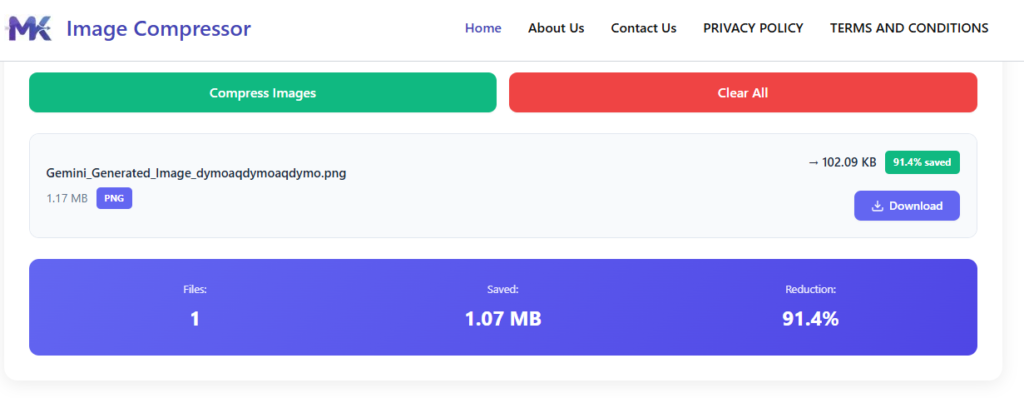
Step 3: Download Images One by One
After compression is done, each image will have its own download button. You download them one at a time there is no bulk or zip download option. You can also see the original size next to the compressed size, so it is easy to check how much each image has been reduced.
Compress Image to 50KB Without Losing Quality
Compressing an image does not have to mean ruining it. This tool uses smart compression that removes unnecessary data from the image file without making it look blurry or washed out.
At 50KB, images still look clear and sharp for most everyday uses. Compare that to compressing to 10KB at that size, visible quality loss is hard to avoid. The 50KB range hits a sweet spot between small file size and good visual quality.
For example, if you are uploading a profile picture to a job portal or government website, a 50KB image will meet the file size requirement while still looking professional and clear.
Features of the 50KB Image Compressor
Supports bulk image upload — add multiple files at once
Individual file download for each compressed image
Fixed output size set to 50KB automatically
Runs entirely in your browser — no server involved
Supports JPG, PNG, and WebP formats
Fast processing even with multiple images
Completely secure — no images are stored or shared
When Do You Need a 50KB Image
There are plenty of real-life situations where a 50KB image size is either required or just more practical:
Online application forms
Many government and educational portals have strict file size limits, and 50KB is a common requirement for passport-style photos or document scans.
Job applications
HR portals often ask for a photo under a certain size. 50KB usually fits within those limits.
Website uploads
Smaller images load faster, which helps your page speed and user experience.
Email attachments
Sending compressed images keeps your email lightweight and easy to receive.
E-commerce listings
Some platforms cap image sizes for product thumbnails or seller profiles.
For instance, if a university admission form asks for a scanned photo under 50KB, you can compress it here in seconds and upload it right away
Frequently Asked Questions
Yes. You can upload as many images as you need in one go, and all of them will be compressed to 50KB with a single click.
Yes, each image has its own download button. There is no option to download all files as a zip. This keeps the process simple and lets you pick exactly which files you want to save.
Completely free. No subscription, no hidden charges, and no account required.
The tool supports JPG, PNG, and WebP. These cover the most commonly used image formats for web and everyday use.
Your images are never uploaded to any server. All compression happens locally inside your browser, so no one else can access your files, and nothing is saved after you close the page.
If your image is already under 50KB, the tool will still process it, but the output may look similar to the original since there is not much to compress. The file size will be kept at or near 50KB as the target.