
Compress Images to 300KB
Compress image to 300KB online. Upload images, click compress, and download instantly.
Drop images here or click to upload
Supports: PNG, JPEG, WebP
Note: All image compression happens entirely in your browser. We do not upload or store your images anywhere.
Who actually needs 300KB images?
You’ve just wrapped a weekend wedding shoot in the Blue Mountains or Banff National Park 800 raw photos, gorgeous golden-hour light, and a bride who’s already texting asking when her gallery goes live. You upload everything to Pixieset, only to realize the original files are 8MB each and your gallery is crawling to load on her iPad. That’s the exact moment 300KB becomes your best friend. It’s not “small” it’s optimised. Your images still look breathtaking on a Retina display, but they load fast enough that the mother-of-the-bride isn’t staring at a spinner at 11pm.
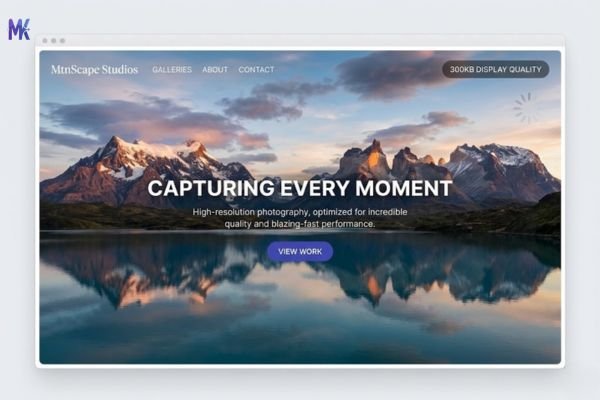
Travel bloggers monetising through Mediavine or AdThrive know this pain too. Your Core Web Vitals score directly affects your ad revenue Google’s algorithm rewards fast pages, and slow-loading hero images are one of the biggest culprits. A stunning 4MB shot of the Dolomites or the Great Ocean Road doesn’t need to stay 4MB to look stunning. At 300KB, a full-width hero image holds its detail, handles compression gracefully, and doesn’t punish your readers on mobile data.
For architecture and nature photographers in Australia and Canada building portfolio sites, 300KB is genuinely the sweet spot for large display images. You want something that loads in under a second, survives being projected on a gallery wall slideshow, and still makes potential clients say “I need this person to shoot my project.” This size delivers that reliably, without the guesswork.
Real platforms and websites that require 300KB
| Platform | Max Allowed | Common Use | Country |
| Pixieset | No hard cap, but 300KB recommended per image for fast gallery loading | Wedding & portrait client galleries | Australia, Canada, Global |
| SmugMug | Unlimited storage, but 300KB optimal for web display albums | Professional photographer portfolios | Australia, Canada |
| Zenfolio | No enforced limit; 300KB keeps load times under 1 second | Client proof galleries, print shop previews | Canada, Global |
| 500px | Up to 60MB upload, but feed display images optimised around 300KB | Photography community, licensing marketplace | Global (strong CA/AU base) |
| Flickr | 1TB storage; community best practice for display images is 200–350KB | Photo sharing, group pools, creative commons | Canada, Australia |
| Google Business Profile | 10KB–5MB accepted; 300KB is the practical sweet spot for quality + speed | Restaurant menus, hotel rooms, retail storefronts | Australia, Canada, Global |
| Mediavine / AdThrive blogs | No enforced limit; 300KB or under is the publisher community benchmark | Blog hero images, in-post feature photos | Global (AU/CA travel bloggers) |
| Instagram (web upload) | Compresses automatically; uploading at 300KB prevents double-compression | Feed posts, portfolio shares | Global |
| Australian government grant portals | Often 500KB max; 300KB gives safe headroom | Project documentation, proposal imagery | Australia |
| Canadian immigration forms (IRCC) | Passport/document photos: 240KB max — but supporting docs sometimes allow 300KB | Supporting evidence photos | Canada |
What image quality looks like at 300KB
Let’s be straight with you: 300KB is genuinely impressive for a compressed image. This isn’t the “good enough” tier this is the display-quality tier. Here’s what you’re actually working with.
What survives beautifully at 300KB: Fine architectural lines stay crisp. Skin tones in wedding portraits hold their warmth without muddy patches. A landscape shot with a clear sky and defined treeline the kind you’d use as a Mediavine hero looks professional even at full-screen width on a 1440p monitor. Depth-of-field bokeh, which is notoriously hard to compress because of all that gradual blur, handles much better at 300KB than at 150KB or even 200KB. You’ll see a visible quality difference if you’ve been working with smaller targets before.
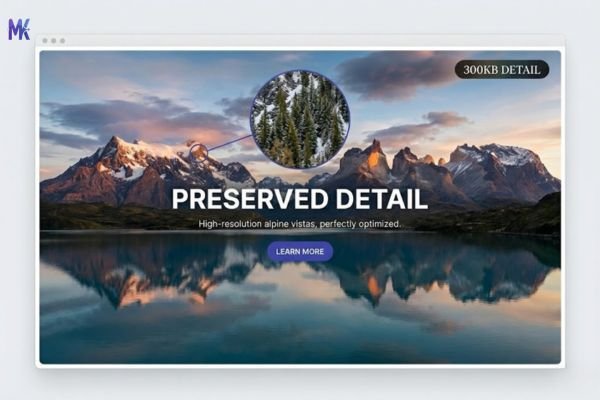
What starts to show strain: Very fine fabric texture in a close-up wedding dress shot you might notice the tiniest softening if you zoom to 100%. Extreme low-light photos with lots of digital noise can look slightly more “mushy” because compression and noise don’t play well together. If your image has large flat colour areas (say, a modern minimalist interior with a white wall taking up 40% of the frame), you probably won’t notice any degradation at all. If it’s packed with micro-detail think a macro shot of a flower’s stamens or a wide city skyline at night with thousands of lit windows zoom in close after compressing and check the critical areas before delivery.
The honest bottom line: For hero images, gallery display images, travel blog headers, and client-facing wedding albums, 300KB is a format you can be proud of. It’s not a compromise. It’s a deliberate, professional choice.
How to get the best result at 300KB
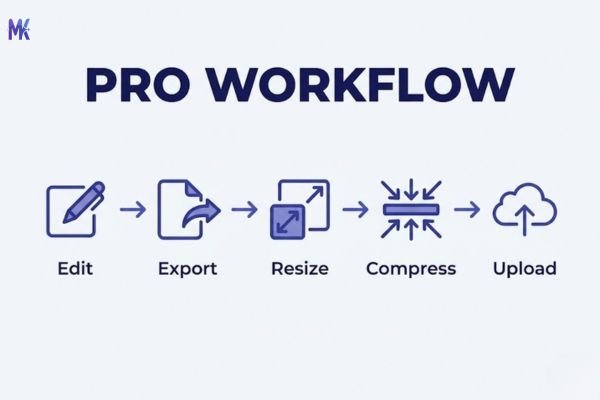
1. Start with a high-quality export from Lightroom or Capture One Don’t feed the compressor a JPEG that’s already been through multiple saves. Export a fresh, high-quality JPEG (quality 90+) directly from your editing software, then compress it to 300KB. Every time a JPEG is re-saved, it accumulates generation loss. Give the tool the cleanest input possible.
2. Crop before you compress If your final image is going to be displayed at 1200×800px on a blog, export it at that size not at 4000×2667px. Compressing a smaller pixel-dimension image to 300KB gives you dramatically better quality than compressing a massive raw export to the same file size. The tool has fewer pixels to squeeze.
3. PNG vs JPG: pick the right format Photographs always compress better as JPG at this size. If you’re compressing a logo, graphic, or illustration with flat colours and text, PNG at 300KB will often look sharper than JPG because PNG uses lossless compression for that type of content. Identify what you’re compressing before you set the format.
4. Use the tool’s bulk feature when you’re working through a gallery If you’re preparing 30 images for a Zenfolio client gallery, you don’t have to do them one at a time you can upload the whole batch and compress everything to 300KB in one go. That’s a genuine time-saver when you’re on a deadline and the client is waiting.
5. Check your hero images on the actual display device After compressing, open the image on a MacBook Pro or iPad (the devices your wedding clients and blog readers are most likely using). Retina screens are less forgiving than standard monitors. A quick check on device takes 30 seconds and catches any quality issues before they go live.
6. Watch the saturation on heavily edited travel shots Heavily boosted colours those deep Lightroom orange-teal presets that travel bloggers love can sometimes show banding in sky gradients after compression. If your image has aggressive colour grading, give the sky or gradient areas a close look after compressing. Sometimes backing off the saturation slightly before export gives you cleaner results.
300KB vs 250KB vs 350KB – Which to choose?
| 250KB | 300KB | 350KB | |
| File size | Smaller | Middle ground | Larger |
| Quality | Good for standard web display | Excellent — full detail preserved | Near-lossless for most images |
| Load speed | Fastest of the three | Fast — under 1 second on most connections | Slightly slower |
| Best for | Email attachments, thumbnails, mobile-first sites | Portfolio galleries, blog heroes, Google Business, client proofs | Print-preview mockups, high-detail architecture, large-screen slideshows |
| Wedding galleries | Acceptable but soft on Retina | Recommended | Overkill for web display |
| Travel blog heroes | Usable, slight quality hit on wide shots | Ideal | May slow Core Web Vitals |
| 500px / Flickr display | Fine for smaller feed thumbnails | Great for featured/display images | Good if you’re not worried about speed |
| Form uploads | Safe choice for strict limits | Safe and high quality | May exceed some portal limits |
Rule of thumb: If you’re unsure, go 300KB. It’s the sweet spot where you almost never have to apologise for quality or file size. Go 250KB when speed is the absolute priority (mobile-heavy audience, strict upload caps). Go 350KB when you’re showcasing detail-heavy work to a client in a controlled, high-bandwidth environment.
Common mistakes people make at 300KB
Mistake 1: Compressing an already-compressed image You downloaded a JPEG from your camera, edited it in Lightroom, exported it as a JPEG, then opened that JPEG in another editor, saved it again, and then tried to compress to 300KB. By that point, the image has already lost quality at multiple stages. The compressor is working with degraded input and can only do so much. Fix: always compress from the cleanest, freshest export you have.
Mistake 2: Ignoring pixel dimensions A 6000×4000px image compressed to 300KB is going to look worse than a 2400×1600px image compressed to 300KB even though the file size is the same. The larger image has far more pixel data being squeezed into the same number of bytes. If your image is going on a blog sidebar at 600px wide, resize it to 600px wide first. This single change makes an enormous difference to perceived quality.

Mistake 3: Using PNG for photos PNG compression is lossless which sounds better, but for photographs it actually means the file stays much larger for the same visual quality compared to JPEG. If you force a photographic image into a 300KB PNG, the compressor has to work much harder, and you’ll often end up with more visible artefacts than you’d get from a JPEG at the same size. JPG is almost always the right choice for photos.
Mistake 4: Not checking the output on mobile You compress an image, it looks perfect on your 27-inch desktop monitor, you upload it, done. Two days later someone mentions the photo looks blurry on their phone. Mobile screens especially older Android devices can reveal compression artefacts that desktop monitors smooth over. Before publishing anything important (a wedding gallery, a portfolio hero, a Google Business photo), give it a quick look on your phone. Takes ten seconds, saves embarrassment.
Latest from Our Blog
Explore image compressor guides, photo resizer tutorials, kilobyte reducer tips, and online image converter tools.
- How Image Compression Works (Beginner Guide + Free Online Tools)
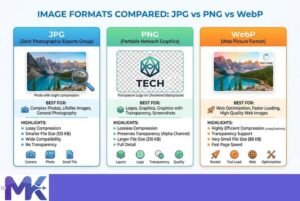
- JPG vs PNG vs WebP — Which Image Format Should You Use?
- How to Compress Images for Government Forms (Free & Easy Guide)

- Reduce Passport Photo Size — Free Online Guide (Step-by-Step)

- Compress Images for Job Application — Free Step-by-Step Guide

- Reduce Image Size Without Losing Quality — Complete Free Guide
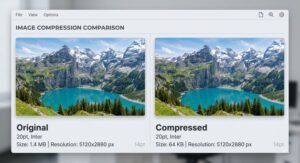
- Why Compress Images for Web — The Complete Guide

- Image Compression for Email Attachments — Complete Free Guide

- Bulk Image Compression — Complete Free Guide

Frequently Asked Questions
It’s actually optimal. Google accepts images between 10KB and 5MB, but their own display engine re-processes large uploads anyway. Uploading at 300KB means you’re giving Google a file that’s already optimised for web display — you get consistent results, the image looks sharp in search results and Maps, and it loads quickly for users on mobile data. Restaurants, hotels, and retail businesses in Australia and Canada use this size routinely for exactly this reason.
Yes, this is genuinely one of the things 300KB does well. Retina and high-DPI screens are demanding because they’re rendering at 2x or 3x pixel density. At 300KB, full-detail preservation means the image holds up on these screens without the soft, mushy look you get at lower sizes like 100KB or 150KB. For Pixieset and Zenfolio galleries where Australian and Canadian wedding clients are reviewing their photos on Apple devices, 300KB is a reliable delivery standard.
It won’t destroy it, but you should be strategic. Fine organic textures the kind nature and wildlife photographers care about compress better than digital noise or harsh artificial patterns. At 300KB, a photo of a Red-tailed Black Cockatoo or a BC coastal rainforest floor will retain impressive detail as long as you follow the earlier tips: start from a clean, fresh JPEG export at display resolution (not full camera resolution), and crop tightly so you’re not compressing empty sky or background. If the fine detail in a specific image matters enormously — say, you’re submitting to a juried competition — do a side-by-side comparison at 100% zoom before committing.
Most Canadian federal and provincial arts grant portals (Canada Council for the Arts, Ontario Creates, Creative BC) allow supporting images up to 500KB or 1MB. 300KB sits comfortably within all of these limits while still looking professional in a panel review context. Always double-check the specific portal’s submission guidelines before uploading — occasionally older government portals in Canada have tighter 200KB limits for specific form fields.
Platforms like WordPress (with plugins like Smush or ShortPixel) and Squarespace compress images automatically, but they compress to their standard — not yours. WordPress might compress your image to 180KB or 420KB depending on the settings someone touched two years ago. Compressing yourself to exactly 300KB means you know precisely what quality you’re delivering, you can preview it before it goes live, and you’re not at the mercy of a server-side algorithm that doesn’t know whether your image is a wedding portrait or a product shot.
When you upload to 500px, they store the original. What other users see in the feed is a web-optimised version that 500px generates themselves. If you’re uploading for community display and portfolio purposes (not for licensing), 300KB is perfectly appropriate – your portfolio looks great and loads fast. If you’re specifically targeting licensing sales through 500px, always upload the highest-resolution original alongside any web-optimised versions, since buyers may request original files.
Directly, yes. Mediavine’s dashboard gives you a Site Speed Score, and image weight is one of the biggest contributors to slow load times. Unoptimised 3–8MB hero images push your Largest Contentful Paint (LCP) score into the red, which Mediavine factors into RPM calculations. Moving your hero images to 300KB is one of the single fastest wins you can make for site speed without touching your theme or plugins. Several travel bloggers in the Mediavine Facebook community (active with strong AU/CA membership) specifically cite image compression as their first speed optimisation.